
Operations & Calendar
LiveKnow what needs doing, who is doing it, and whether it was done.
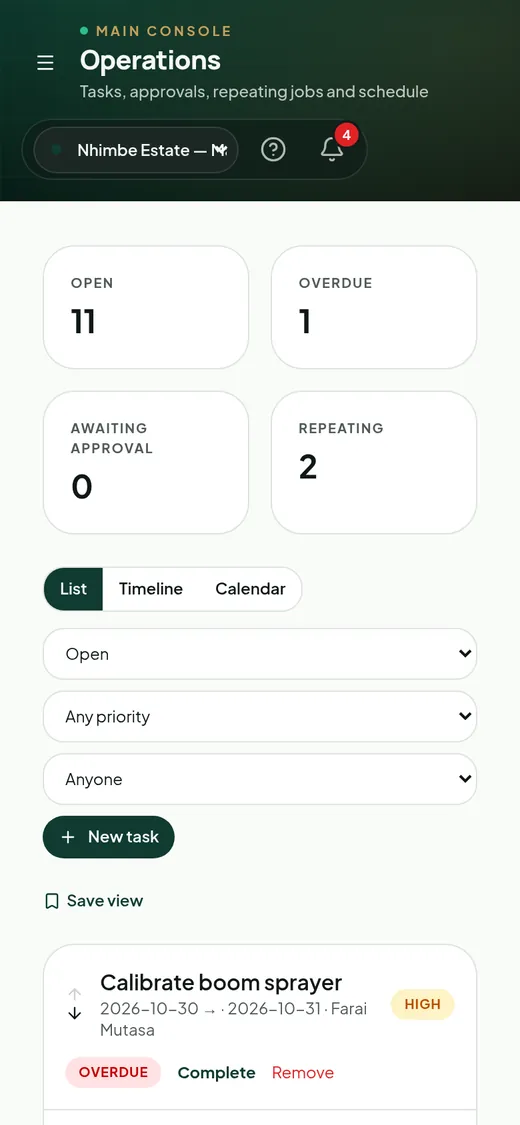
Tasks with priorities, approvals, repeating schedules and photo proof; a month calendar with drag-to-reschedule, a timeline view and operational reminders.
The problem
Work slips through the cracks
- Instructions are given verbally and forgotten.
- There is no proof work was done properly.
- Recurring jobs depend on one person remembering.
The AgriLink way
One connected record.
Operations turns instructions into tracked tasks with owners, due dates, approval and evidence — and repeats routine work automatically.
Key capabilities
What Farm Operations does
Task management
Priorities, assignment, ordering and status for every job.
Supervisor approval
Only approvers can sign off; the backend enforces it.
Repeating tasks
Completing a recurring task schedules the next one.
Calendar & timeline
Month calendar with drag-to-reschedule and a timeline view.
Completion evidence
Photos and notes attached to the task they prove.
Inspections & follow-ups
Scouting findings become corrective tasks in one click.
How it works
Four steps, no re-typing.
- 1Plan the week's work.
- 2Assign to people or teams.
- 3Workers complete with evidence.
- 4Supervisors approve and costs post.
Feature group D
Operations
Every feature shows whether it is live, live with limits, or planned — so you know exactly what you get today.
- Task managementTasks with priority, owner and status.Live
- Task assignmentAssign to workers or teams.Live
- Task dependenciesPrerequisite activities.Planned
- Operations calendarMonth calendar with drag-to-reschedule.Live
- Gantt viewsTimeline view of planned work.Live · limited
- Supervisor verificationApprover-only sign-off.Live
- Work completion evidencePhotos and notes on completion.Live
- InspectionsScouting and inspection records.Live
- Corrective actionsFindings turned into follow-up tasks.Live
- Workflow automationProposals that create tasks on approval.Live · limited
1 tap
to turn a finding into a task
Auto
next task for repeating work
Proof
photos on every completed job
Connected features
Works hand in hand with
Who uses it
Popular with
Ready to bring farm operations into one system?
Other modules: Farm Management · Crop Management · Livestock Management · Workforce Management · Inventory & Procurement